
Setting up a Site-to-Site VPN
Connect a database in your network to Edmund over an IPsec VPN, using two tunnels with automatic failover.
This guide sets up an IPsec Site-to-Site VPN between a gateway in your network and Edmund’s AWS environment, so Edmund can reach a database you host.
You expose a single address — or a small range — to Edmund over the tunnel. Edmund uses that address internally; your real database can sit either on the VPN gateway itself or anywhere behind it. Two tunnels are established with automatic failover: both stay up, but only one carries traffic at a time.
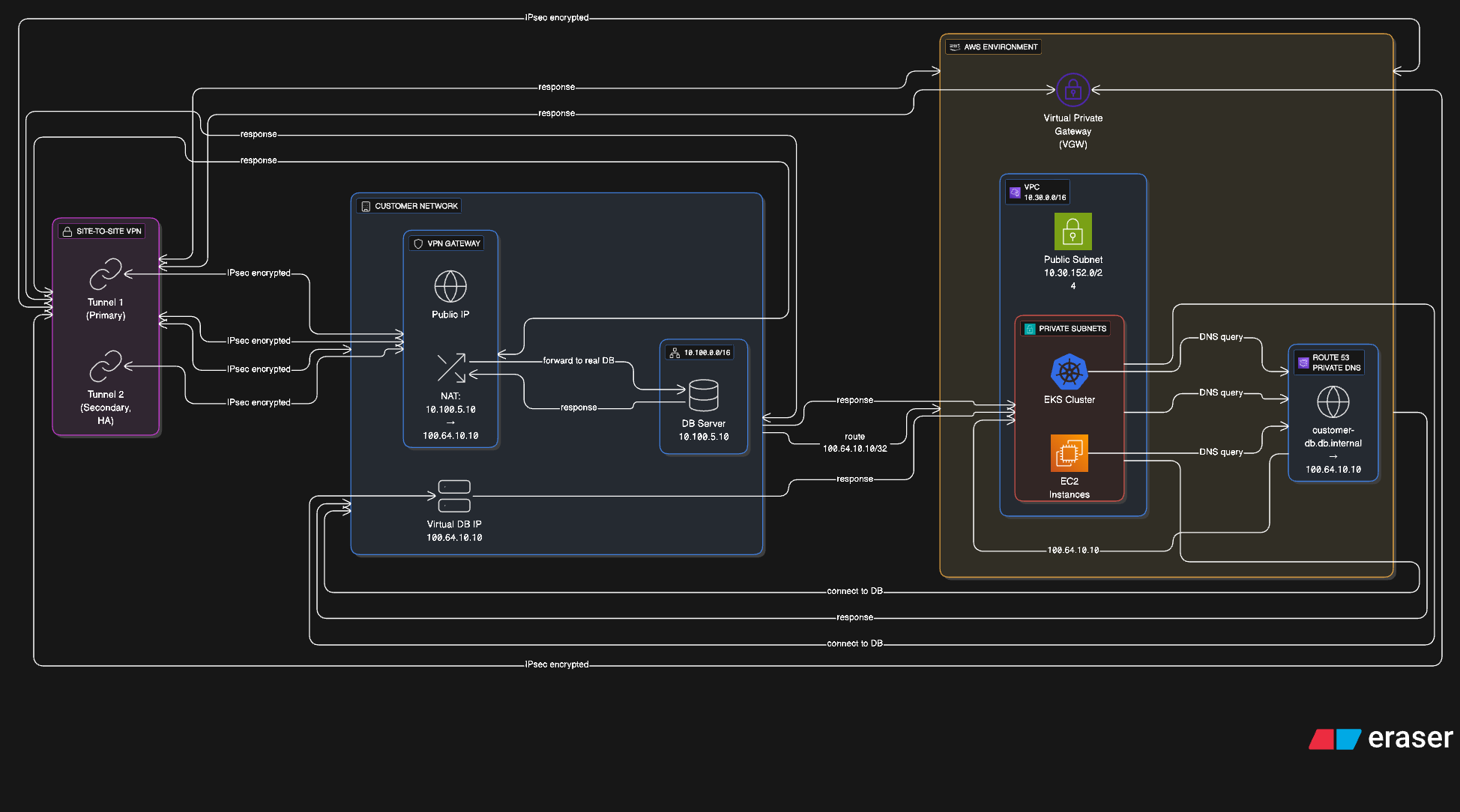
The instructions assume Ubuntu with strongSwan. Any IPsec implementation supporting IKEv2 and route-based tunnels works; what matters are the parameters in Cryptographic parameters.
What Edmund provides
Edmund sends these values, taken from the AWS VPN configuration. Substitute them wherever they appear as placeholders below.
| Value | What it is |
|---|---|
AWS_VPC_CIDR | Edmund’s VPC range, for example 10.30.0.0/16 |
CUSTOMER_PUBLIC_IP | Your public IP, registered in AWS as the Customer Gateway |
CUSTOMER_VIRT_DB_IP | The address Edmund uses to reach your database |
AWS_TUNNEL1_OUTSIDE_IP | Public IP of tunnel 1 on the AWS side |
AWS_TUNNEL2_OUTSIDE_IP | Public IP of tunnel 2 |
TUNNEL1_INSIDE_CGW_IP/30 | Your inside address for tunnel 1, a 169.254.x.x/30 |
TUNNEL1_INSIDE_VGW_IP/30 | AWS inside address for tunnel 1 |
TUNNEL2_INSIDE_CGW_IP/30 | Your inside address for tunnel 2 |
TUNNEL2_INSIDE_VGW_IP/30 | AWS inside address for tunnel 2 |
PSK_TUNNEL1 | Pre-shared key for tunnel 1 |
PSK_TUNNEL2 | Pre-shared key for tunnel 2 |
Pre-shared keys are delivered over an encrypted channel, never by plain email. Treat them as you would any other credential.
Prerequisites
- A server running Ubuntu, or another Debian-based distribution, to act as the VPN gateway.
- That server reaches the internet and is the host registered in AWS as the
Customer Gateway, at
CUSTOMER_PUBLIC_IP. - Root or
sudoaccess.
1. Install strongSwan
sudo apt update
sudo apt install -y strongswan
2. Enable IP forwarding
Add or uncomment this line in /etc/sysctl.conf:
net.ipv4.ip_forward = 1Apply it:
sudo sysctl -p3. Add the virtual database address
Edmund reaches your database at a single address, CUSTOMER_VIRT_DB_IP. That
address has to exist on your gateway — as a loopback address if the database runs
on the gateway itself, or as the NAT target for a database elsewhere.
To add it for testing:
sudo ip addr add CUSTOMER_VIRT_DB_IP/32 dev lo
ip addr show lo | grep CUSTOMER_VIRT_DB_IP
For production, put the address in your network configuration — netplan or ifupdown — so it survives a reboot.
4. Configure strongSwan
The configuration is route-based: the security policy stays wide and an updown script creates a VTI interface and the routes. Both tunnels start automatically; route metrics decide which one carries traffic.
/etc/ipsec.conf
config setup
  charondebug="ike 1, knl 1, cfg 0"
  uniqueids=no

# === Tunnel1 — primary ===
conn Tunnel1
  auto=start

  left=%defaultroute
  leftid=CUSTOMER_PUBLIC_IP
  right=AWS_TUNNEL1_OUTSIDE_IP

  type=tunnel
  keyexchange=ikev2
  ike=aes256gcm16-prfsha384-ecp384
  ikelifetime=8h
  esp=aes256gcm16-ecp384
  lifetime=1h
  keyingtries=%forever

  leftauth=psk
  rightauth=psk

  # Route-based: the policy stays wide, VTI and routes do the steering.
  leftsubnet=0.0.0.0/0
  rightsubnet=0.0.0.0/0

  dpddelay=10s
  dpdtimeout=30s
  dpdaction=restart

  mark=100

  leftupdown="/etc/ipsec.d/aws-updown.sh \
    -ln Tunnel1 \
    -ll TUNNEL1_INSIDE_CGW_IP/30 \
    -lr TUNNEL1_INSIDE_VGW_IP/30 \
    -m 100 \
    -r AWS_VPC_CIDR"

# === Tunnel2 — secondary, failover ===
conn Tunnel2
  auto=start

  left=%defaultroute
  leftid=CUSTOMER_PUBLIC_IP
  right=AWS_TUNNEL2_OUTSIDE_IP

  type=tunnel
  keyexchange=ikev2
  ike=aes256gcm16-prfsha384-ecp384
  ikelifetime=8h
  esp=aes256gcm16-ecp384
  lifetime=1h
  keyingtries=%forever

  leftauth=psk
  rightauth=psk

  leftsubnet=0.0.0.0/0
  rightsubnet=0.0.0.0/0

  dpddelay=10s
  dpdtimeout=30s
  dpdaction=restart

  mark=200

  leftupdown="/etc/ipsec.d/aws-updown.sh \
    -ln Tunnel2 \
    -ll TUNNEL2_INSIDE_CGW_IP/30 \
    -lr TUNNEL2_INSIDE_VGW_IP/30 \
    -m 200 \
-r AWS_VPC_CIDR"Each tunnel needs its own mark value. Reusing one breaks the second tunnel’s
routing without any obvious error.
/etc/ipsec.secrets
CUSTOMER_PUBLIC_IP AWS_TUNNEL1_OUTSIDE_IP : PSK "PSK_TUNNEL1"
CUSTOMER_PUBLIC_IP AWS_TUNNEL2_OUTSIDE_IP : PSK "PSK_TUNNEL2"
Filled in, the file takes this shape. The addresses below are reserved documentation ranges, not real endpoints:
203.0.113.10 198.51.100.21 : PSK "REPLACE_WITH_THE_KEY_EDMUND_SENT_FOR_TUNNEL_1"
203.0.113.10 198.51.100.22 : PSK "REPLACE_WITH_THE_KEY_EDMUND_SENT_FOR_TUNNEL_2"
Restrict the file to root:
sudo chmod 600 /etc/ipsec.secrets5. Add the updown script
The script creates a VTI interface per tunnel, sets the required sysctl and
iptables entries, and adds routes into AWS_VPC_CIDR with per-tunnel metrics.
When a tunnel drops it removes them again, which is what allows failover.
Create /etc/ipsec.d/aws-updown.sh:
#!/bin/bash

while [[ $# > 1 ]]; do
  case ${1} in
    -ln|--link-name)
      TUNNEL_NAME="${2}"
      TUNNEL_PHY_INTERFACE="${PLUTO_INTERFACE}"
      shift
      ;;
    -ll|--link-local)
      TUNNEL_LOCAL_ADDRESS="${2}"
      TUNNEL_LOCAL_ENDPOINT="${PLUTO_ME}"
      shift
      ;;
    -lr|--link-remote)
      TUNNEL_REMOTE_ADDRESS="${2}"
      TUNNEL_REMOTE_ENDPOINT="${PLUTO_PEER}"
      shift
      ;;
    -m|--mark)
      TUNNEL_MARK="${2}"
      shift
      ;;
    -r|--static-route)
      TUNNEL_STATIC_ROUTE="${2}"
      shift
      ;;
    *)
      echo "${0}: Unknown argument \"${1}\"" >&2
      ;;
  esac
  shift
done

command_exists() {
  type "$1" >&2 2>&2
}

create_interface() {
  ip link add ${TUNNEL_NAME} type vti local ${TUNNEL_LOCAL_ENDPOINT} remote ${TUNNEL_REMOTE_ENDPOINT} key ${TUNNEL_MARK}
  ip addr add ${TUNNEL_LOCAL_ADDRESS} remote ${TUNNEL_REMOTE_ADDRESS} dev ${TUNNEL_NAME}
  ip link set ${TUNNEL_NAME} up mtu 1419
}

configure_sysctl() {
  sysctl -w net.ipv4.ip_forward=1
  sysctl -w net.ipv4.conf.${TUNNEL_NAME}.rp_filter=2
  sysctl -w net.ipv4.conf.${TUNNEL_NAME}.disable_policy=1
  sysctl -w net.ipv4.conf.${TUNNEL_PHY_INTERFACE}.disable_xfrm=1
  sysctl -w net.ipv4.conf.${TUNNEL_PHY_INTERFACE}.disable_policy=1
}

add_route() {
  IFS=',' read -ra route <<< "${TUNNEL_STATIC_ROUTE}"
  for i in "${route[@]}"; do
    ip route add ${i} dev ${TUNNEL_NAME} metric ${TUNNEL_MARK}
  done
  iptables -t mangle -A FORWARD -o ${TUNNEL_NAME} -p tcp --tcp-flags SYN,RST SYN -j TCPMSS --clamp-mss-to-pmtu
  iptables -t mangle -A INPUT -p esp -s ${TUNNEL_REMOTE_ENDPOINT} -d ${TUNNEL_LOCAL_ENDPOINT} -j MARK --set-xmark ${TUNNEL_MARK}
  ip route flush table 220
}

cleanup() {
  IFS=',' read -ra route <<< "${TUNNEL_STATIC_ROUTE}"
  for i in "${route[@]}"; do
    ip route del ${i} dev ${TUNNEL_NAME} metric ${TUNNEL_MARK}
  done
  iptables -t mangle -D FORWARD -o ${TUNNEL_NAME} -p tcp --tcp-flags SYN,RST SYN -j TCPMSS --clamp-mss-to-pmtu
  iptables -t mangle -D INPUT -p esp -s ${TUNNEL_REMOTE_ENDPOINT} -d ${TUNNEL_LOCAL_ENDPOINT} -j MARK --set-xmark ${TUNNEL_MARK}
  ip route flush cache
}

delete_interface() {
  ip link set ${TUNNEL_NAME} down
  ip link del ${TUNNEL_NAME}
}

command_exists ip || echo "ERROR: ip command is required" >&2 2>&2
command_exists iptables || echo "ERROR: iptables command is required" >&2 2>&2
command_exists sysctl || echo "ERROR: sysctl command is required" >&2 2>&2

case "${PLUTO_VERB}" in
  up-client)
    create_interface
    configure_sysctl
    add_route
    ;;
  down-client)
    cleanup
    delete_interface
    ;;
esac
Make it executable:
sudo chmod 744 /etc/ipsec.d/aws-updown.sh6. Route to your database
Option A — the database runs on the VPN gateway
Nothing further is needed. The database listens on the gateway,
CUSTOMER_VIRT_DB_IP/32 is on its loopback, and traffic from AWS_VPC_CIDR
arrives directly.
Allow connections from AWS_VPC_CIDR in the database’s own access rules — for
PostgreSQL that means pg_hba.conf.
Option B — the database runs elsewhere in your network
Two things are required: a route so return traffic finds the gateway, and NAT so the virtual address maps to the real one.
On the internal router the database uses as its default gateway:
Destination: AWS_VPC_CIDR
Next hop:    the internal address of the VPN gateway
On the VPN gateway, translate between the virtual and the real address:
# Traffic from Edmund to the virtual address goes to the real database
sudo iptables -t nat -A PREROUTING \
  -s AWS_VPC_CIDR -d CUSTOMER_VIRT_DB_IP -p tcp --dport 5432 \
  -j DNAT --to-destination DB_REAL_IP:5432

# Optional: the database sees connections as coming from the virtual address
sudo iptables -t nat -A POSTROUTING \
  -s AWS_VPC_CIDR -d DB_REAL_IP -p tcp --dport 5432 \
  -j SNAT --to-source CUSTOMER_VIRT_DB_IP
Adjust the port for your database engine.
7. Start and verify
sudo ipsec restart
sudo ipsec statusall
Both connections should report ESTABLISHED, and under Security Associations
both tunnels should be INSTALLED, with bytes_i and bytes_o rising once
traffic flows.
Test from the gateway:
ping -I CUSTOMER_VIRT_DB_IP <an address inside AWS_VPC_CIDR>Edmund tests from the other side, reaching your database through the DNS name provided during setup.
Cryptographic parameters
The tunnels use IKEv2 with AES-256-GCM and an elliptic-curve group:
| Parameter | Value |
|---|---|
| IKE version | IKEv2 |
| IKE encryption | AES-256-GCM-16 |
| IKE integrity and PRF | SHA-384 |
| IKE Diffie-Hellman group | Group 20, ECP-384 |
| ESP encryption | AES-256-GCM-16 |
| ESP perfect forward secrecy | Group 20, ECP-384 |
This matches the AWS recommendation and satisfies the minimum requirements published by NÚKIB, the Czech national cyber security authority: AES-128 or stronger, SHA-256 or stronger, and Diffie-Hellman group 14 or higher.
If your device supports neither GCM nor group 20, this combination is compatible and still meets that minimum:
ike=aes256-sha384-modp2048
esp=aes256-sha384-modp2048Earlier deployments used IKEv1 with aes128-sha1-modp1024. SHA-1 and the
1024-bit group are no longer considered adequate, and existing tunnels should be
migrated to the parameters above.
Rotating pre-shared keys
Rotate at least once a year, and immediately when someone with access to the keys leaves.
Because there are two tunnels, rotation causes no loss of connectivity — one stays up while the other is changed.
- Generate a new key
At least 32 characters, alphanumeric plus
.and_, not starting with0. - Update tunnel 1 on the AWS side
Edmund changes it in the AWS console. Tunnel 1 drops and traffic fails over to tunnel 2.
- Update tunnel 1 on your side
Edit
/etc/ipsec.secrets, then reload:sudo ipsec reload secrets - Confirm tunnel 1 is back
sudo ipsec statusall - Repeat for tunnel 2
Only once tunnel 1 is established again.
Each tunnel is typically down for one to five minutes during its own rotation. Overall connectivity is unaffected.
Monitoring
AWS collects tunnel metrics into Amazon CloudWatch automatically:
| Metric | Values |
|---|---|
TunnelState | 0 is down, 1 is up |
TunnelDataIn | Bytes received, after decryption |
TunnelDataOut | Bytes sent, before encryption |
Edmund alarms on TunnelState below 1 across three consecutive one-minute
periods, notifying the on-call team. If both tunnels are down at once, Edmund is
notified within five minutes of detection.
On your side, Dead Peer Detection recovers a dropped tunnel without intervention:
dpddelay=10s      # liveness check every 10 seconds
dpdtimeout=30s    # give up after 30 seconds without a reply
dpdaction=restart # attempt to re-establish
strongSwan logs go to the systemd journal:
sudo journalctl -u strongswan -fForwarding those logs to your own SIEM is recommended.
What to send Edmund
Confirm each of these before the tunnel can be brought up.
| Value | Notes |
|---|---|
| Public IP of your VPN gateway | Registered in AWS as the Customer Gateway |
| The address Edmund should use for your database | Must not overlap with Edmund’s VPC range |
| Database engine and port | For example PostgreSQL on 5432 |
| A technical contact | For key rotation and incident notifications |
Edmund replies with the tunnel parameters listed under What Edmund provides.