Connection to customer data sources
Option 1: You hosting database in AWS
In this scenario, your database already runs in AWS, so we don’t need any extra copy or mirror of your data. Edmund simply reads the data directly from your AWS account over a secure, private connection.
Our side (AWS)
Our responsibilities remain the same:
-
Set up a private connection between our AWS and your AWS account (for example VPC peering, PrivateLink or site-to-site VPN).
-
Configure Edmund so it uses only this private connection to reach your database.
-
Monitor the connection and handle errors on our side, so Edmund stays stable and responsive.
Customer side (AWS account)
-
Your team provides a database endpoint that is reachable only from our AWS environment.
-
Configure access rules (security groups, firewall rules, IAM) so only our systems can connect.
-
Keep the database running and healthy in your AWS account; we only read and, if agreed, write data that Edmund needs.
Option 2: NAT Gateway with Port Forwarding
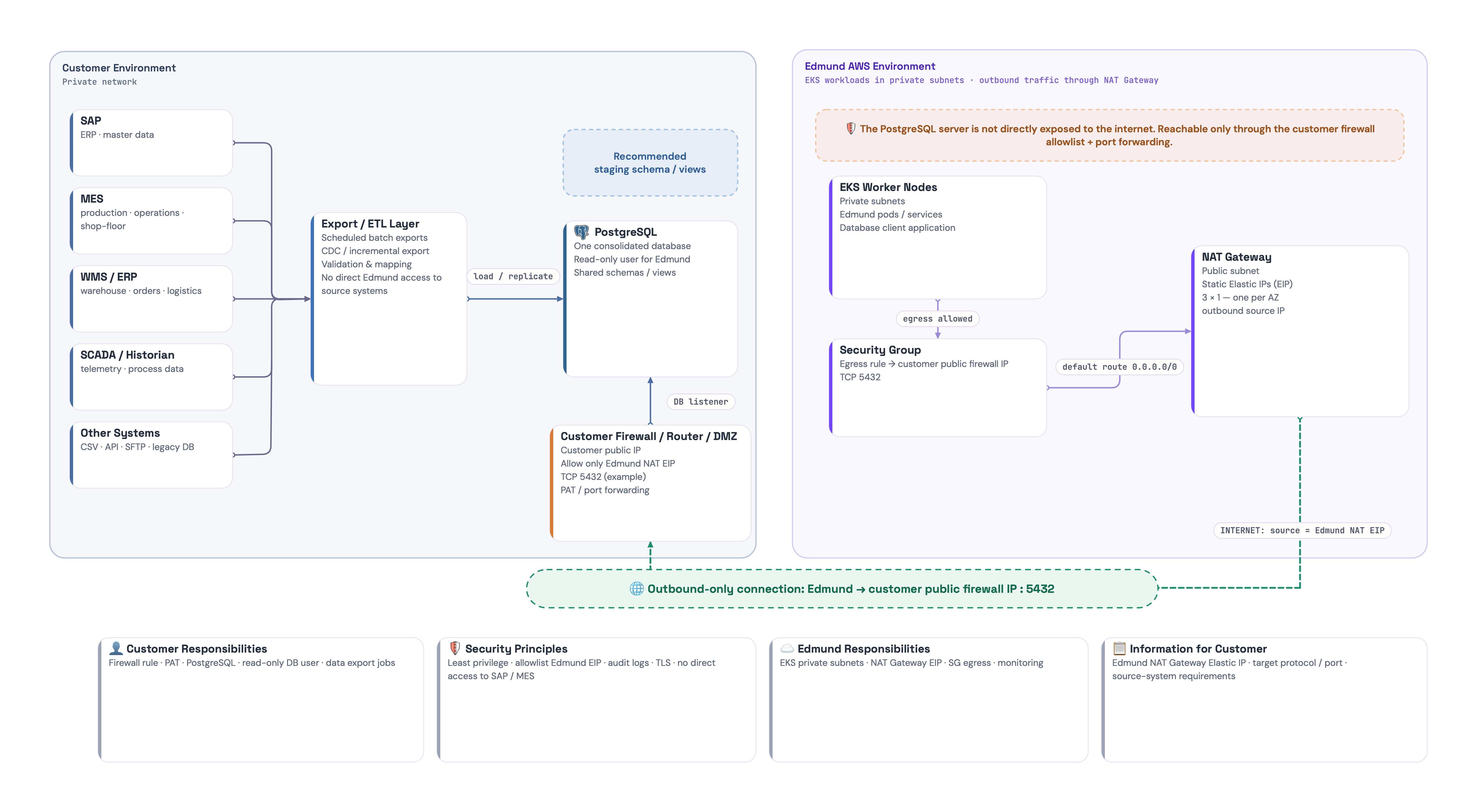
This approach uses our NAT Gateway’s static IP/IPs to securely connect to the customer’s database, which remains on their private network. The connection is secured by a specific firewall rule on the customer’s end that forwards traffic from our IP directly to the internal database.
Our side (AWS)
Our responsibilities remain the same:
-
Verify EKS Subnet Configuration: Ensure our EKS worker nodes are running in private subnets.
-
Configure NAT Gateway:
-
We must have a NAT Gateway in a public subnet with a static Elastic IP (EIP) address. This is the single, predictable IP our pods will use for outbound traffic.
-
The Route Table for our private EKS subnets must have a default route (0.0.0.0/0) that points to the NAT Gateway.
-
-
Configure Security Groups:
-
The Security Group for our EKS worker nodes needs an Egress (Outbound) Rule.
-
This rule must allow traffic to the customer’s public firewall IP on the port they specify (e.g., TCP port 5432).
-
-
Provide our IP Address: Give the customer the static Elastic IP address of our NAT Gateway.
Customer’s Side
This is where the key distinction lies. The customer will use a common networking technique called Port Address Translation (PAT) or port forwarding.
-
Receive our IP: They take the Elastic IP address of our NAT Gateway that we provided.
-
Configure Firewall/Router Rule: Their network administrator will configure their internet-facing firewall or router with a specific rule:
-
Action: ALLOW traffic.
-
Source IP: ONLY our NAT Gateway’s Elastic IP address.
-
Destination: Their firewall’s own public IP address.
-
Destination Port: The public port they want to expose (e.g., TCP 5432).
-
Forwarding/Translation: Forward this allowed traffic to the internal, private IP address of their database server on its listening port.
-
This setup ensures that only traffic originating from our known IP address can reach their database, and the database server itself is never directly exposed to the internet.
Option 3: Site-to-Site VPN
This is our universal, provider-agnostic connection option. It works the same way whether your database lives on-premises or in another cloud (Microsoft Azure, Google Cloud, or AWS), which makes it the recommended baseline whenever you host the database in your own environment. It is also the only connectivity method natively supported across all major clouds.
This approach creates a private, encrypted IPsec tunnel between our AWS VPC and your network. Your database stays physically with you and is never exposed to the public internet – from Edmund’s point of view it looks like part of a private internal network.
Our Side (AWS)
We are always the VPN server on the AWS side. You only connect to us as a VPN client. On our side we:
-
Create the AWS Site-to-Site VPN endpoints (typically two IPsec tunnels for high availability).
-
Generate the VPN configuration (tunnel IPs, keys, networks, etc.) and provide it to your network team so they can configure their VPN device as the client.
-
Configure routing so that traffic from Edmund to your database goes only through the VPN.
-
If needed, agree on a special virtual IP range (for example 100.64.x.x) that you use to NAT your internal DB; we use only this range inside AWS.
-
Create an internal DNS record in Route 53 (for example db-your_company.db.internal), so our applications use a simple hostname and all network complexity is hidden.
-
Lock down our security groups so only our internal components can reach your database over the VPN on the agreed port.
Customer’s Side
On your side you always act as the VPN client connecting to our AWS VPN server:
-
Provide the public IP of your VPN device and the internal network ranges (CIDR blocks) that should be reachable over the tunnel.
-
Configure any IPsec-capable VPN gateway (hardware firewall, router, cloud VPN, Linux, etc.) using the configuration we supply.
-
Optionally NAT your internal database to an agreed virtual IP (for example 100.64.10.10), which is the only IP we see and use for Edmund.
-
Update your internal firewall so traffic from our AWS VPC range to your database IP/port is allowed.
-
Operate and monitor the VPN gateway and internet link – if the VPN or your line goes down, Edmund cannot reach the database.
If your database is in Azure or GCP
When your database already runs in your own cloud, there is no on-premise part to solve and the setup is simpler and cleaner. The connection uses the same Site-to-Site VPN as above, terminated on your cloud’s native VPN gateway instead of a physical device:
-
Your cloud administrators prepare and maintain the database in your Azure or GCP environment.
-
On your side you use the provider’s managed VPN gateway – Azure VPN Gateway or Google Cloud HA VPN – as the VPN client, configured from the tunnel details we supply. We recommend a route-based VPN with BGP (two tunnels, active-active) so failover is automatic; this is the standard, well-documented pattern on both Azure and GCP.
-
Update your cloud firewall and network rules so only our systems can reach the database, and coordinate identity and access (IAM, service accounts, roles) so Edmund has only the permissions it needs.
-
Optionally place a database replica in a region closer to Edmund (eu-west-1, Ireland) to reduce latency.
Optional upgrade: native cloud interconnect
For high-bandwidth or latency-sensitive workloads, a dedicated private interconnect can replace the VPN entirely, so traffic never touches the public internet at all:
-
Google Cloud: a native, dedicated connection is available today – either AWS Interconnect – multicloud (provisioned directly from the AWS Direct Connect console) or Google Cross-Cloud Interconnect (10 Gbps and up).
-
Microsoft Azure: native AWS interconnect support is announced for 2026. Until it ships, private (non-VPN) connectivity requires ExpressRoute paired with AWS Direct Connect through a colocation or exchange partner such as Megaport or Equinix.
These are enterprise-grade, high-bandwidth options with correspondingly higher cost and setup effort. For Edmund’s typical read-heavy database workload, the Site-to-Site VPN is usually sufficient and far more cost-effective, so we treat the interconnect as an optional upgrade rather than the default.
Performance and Latency Considerations
A Site-to-Site VPN runs over the public internet, so its performance is always “best effort” and depends mainly on your line and the routing on the internet.
Throughput (speed)
-
A standard AWS Site-to-Site VPN tunnel is designed for speeds up to roughly 1.25 Gbps per tunnel in ideal conditions (clean line, no bottlenecks on either side).
-
In real life, the main limit is almost always your internet connection and your VPN gateway, not the theoretical tunnel maximum.
-
For typical business connections, this is more than enough for Edmund’s pattern of many reads and smaller writes.
Latency (delay)
-
Latency is driven by geography and the internet path between your network and our AWS region.
-
For connections between our region (eu-west-1, Ireland) and Central Europe, we normally see round-trip times on the order of a few tens of milliseconds, which is acceptable for most business applications.
-
Temporary congestion on the internet can add jitter (variable delay), so individual queries might occasionally be slower, but overall behaviour is usually stable enough for Edmund.
Key takeaway: Site-to-Site VPN gives us a secure, private path, but performance is ultimately tied to the quality and stability of your network connection, not just AWS.
Cost Breakdown
From a commercial point of view, this is our most expensive integration option. It adds:
-
Extra engineering and coordination with your network team (design, setup, testing).
-
Ongoing operation and monitoring of the VPN on both sides.
-
AWS VPN and data-transfer charges on our side.
To keep things simple, we express pricing in broad ranges depending on database size and expected traffic. These are indicative ranges on top of the standard Edmund licence:
-
Smaller databases & lighter traffic
-
Typical profile: operational DB up to a few tens of GB, Edmund used mainly for day-to-day work, no massive analytics.
-
Typical VPN cost range: roughly €200–€400 per month, depending mainly on traffic patterns and required SLA.
-
-
Medium databases & regular reporting/analytics
-
Typical profile: DB in the hundreds of GB, Edmund used actively throughout the day plus regular reporting or dashboards.
-
Typical VPN cost range: roughly €400–€800 per month, depending on how “chatty” the workload is (number of queries, peak times, etc.).
-
-
Large databases & heavy, data-intensive usage
-
Typical profile: large production DB (hundreds of GB to TBs) with frequent reads and complex analytics or integrations running over the tunnel.
-
Typical VPN cost range: roughly €800–€1,500+ per month, positioned as a premium integration for customers with very high demands on live data access.
-
These ranges are meant to set expectations: the Site-to-Site VPN model is a security-driven, premium option, ideal when you want Edmund to work with a live database that never leaves your environment and are comfortable paying extra for that level of control and isolation. Exact pricing is always agreed in a separate commercial proposal based on your concrete traffic and setup.
Best-Practice connection
Option 2 – NAT Gateway with Port Forwarding: