
Setting up AWS VPC peering
Connect a database in your AWS account to Edmund over a private link that never touches the public internet.
If your databases already run in AWS, VPC peering is the simplest way to let Edmund reach them. It creates a direct private link between Edmund’s AWS network and yours. No traffic crosses the public internet at any point.
This is an alternative to the Site-to-Site VPN, which is what you need when the database is not in AWS.
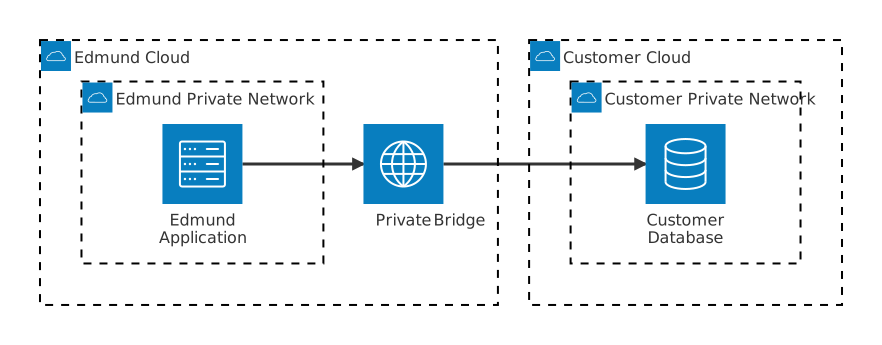
What VPC peering is
A peering connection is a private link between two AWS networks. Once it exists:
- Traffic between the two stays inside AWS.
- Edmund reaches your databases at their private addresses, as though the two networks were joined by a dedicated cable.
- Each side keeps full control over what it lets in.
Who does what
Peering works as a handshake: one side requests, the other accepts.
| Role | Party | Action |
|---|---|---|
| Requester | Edmund | Sends the peering request to your AWS account |
| Accepter | You | Reviews and approves it in your AWS console |
After the handshake, each side configures its own routing and access rules independently.
What each side provides
Edmund gives you:
| Value | Purpose |
|---|---|
| AWS account ID | So you can confirm the request came from Edmund |
| AWS region | Where Edmund runs |
| Network range (CIDR) | The addresses Edmund traffic will come from |
You give Edmund:
| Value | Purpose |
|---|---|
| AWS account ID | To address the peering request to the right account |
| VPC ID | Which of your networks holds the databases |
| Network range (CIDR) | Required for routing |
| AWS region | Where the databases run |
| Database hostnames | The private addresses Edmund should connect to |
| Database ports | For example 5432 for PostgreSQL, 3306 for MySQL |
The two network ranges must not overlap. This is an AWS constraint, not a preference — peering cannot be established between overlapping CIDRs. Check this before anything else; it is the most common reason setup stalls.
What Edmund does
Once your details arrive, Edmund:
- Sends the peering request to your account and VPC.
- Updates its route tables so traffic for your network uses the peering connection.
- Enables DNS resolution, so Edmund can use your database hostnames rather than raw addresses.
This runs through Edmund’s infrastructure pipeline; no manual steps on our side.
What you do
- Accept the peering request
In the AWS console for the account holding the databases, go to VPC → Peering Connections. Find the request from Edmund, shown as Pending Acceptance, and choose Actions → Accept Request.
The status changes to Active.
- Update your route tables
This is what lets return traffic find its way back.
For each subnet containing a database Edmund needs:
- VPC → Route Tables, and select the route table for that subnet.
- Routes → Edit routes → Add route.
- Set Destination to Edmund’s network range, and Target to the peering
connection,
pcx-…. - Save.
Repeat for every subnet and availability zone that hosts a relevant database. A database in a subnet you miss will simply be unreachable.
- Allow Edmund through the database firewall
AWS databases sit behind a security group.
- EC2 → Security Groups, or reach it from RDS → your database → Connectivity.
- Select the security group attached to the database.
- Inbound rules → Edit → Add rule:
- Protocol: TCP
- Port: the database port, for example
5432 - Source: Edmund’s network range
- Description: something recognisable, such as
Edmund application access
- Save.
Scoping the source to Edmund’s range means only Edmund can connect.
- Enable DNS resolution
Recommended. It lets Edmund connect by hostname rather than by address, which survives an address change.
VPC → Peering Connections, select the active connection, then Actions → Edit DNS settings and enable Allow DNS resolution from remote VPC.
After setup
Edmund connects to your database using its private hostname. Traffic goes from Edmund’s network, across the peering connection, into your network and to the database — entirely within AWS. Database credentials live in Edmund’s secrets vault and never appear in code.
Security summary
| Concern | How it is addressed |
|---|---|
| Exposure to the public internet | None; all traffic stays private within AWS |
| Who can reach your databases | Only Edmund’s network range, enforced by your own security group |
| Can Edmund reach anything else of yours? | Only what your route tables and security groups allow |
| Can you reach Edmund’s systems? | No; Edmund adds no inbound rules for the peering connection |
| Credentials | Held in Edmund’s secrets vault, never hardcoded |
| Scope | Limited to these two networks |
Checklist
| # | Action | Who |
|---|---|---|
| 1 | Provide network details | You |
| 2 | Send the peering request | Edmund |
| 3 | Accept the request | You |
| 4 | Update route tables | Edmund |
| 5 | Update route tables | You |
| 6 | Add the database firewall rule | You |
| 7 | Enable DNS resolution | Both |
| 8 | Configure the database connection | Edmund |
| 9 | Test end to end | Both |